Optimize OpenAI API costs by instrumenting token usage exactly, routing requests to lower-cost models when quality thresholds allow, caching deterministic responses, and enforcing budget guardrails with anomaly detection.
- Token accounting with tiktoken and per-request usage logging is essential to detect cost anomalies early.
- Model tiering based on measurable task quality lets you use expensive models only where they add value.
- Caching and batching reduce redundant token consumption, especially for repetitive and asynchronous workloads.
- Observability dashboards and budget alerts with kill switches prevent uncontrolled spending and enable rapid incident response.
- All cost thresholds and model selections must be revalidated against your own production data and updated model pricing.
Cost Anatomy and Token Accounting
OpenAI API bills are driven by token counts, model pricing, and request patterns. A token is roughly four characters of English text, but exact counts depend on the tokenizer. Use the tiktoken library to count tokens exactly, not word or character counts, because pricing is per 1,000 tokens. In multi-turn chat calls, every previous message is resent, which can multiply token usage by conversation length. Truncate or summarize history after a fixed number of turns, such as 10, and log input and output tokens per request using the usage response field. Without per-request metrics, cost anomalies take days to detect. Set up alerts when daily token usage exceeds 120% of a seven-day rolling average to catch accidental loops or prompt bloat early.
Model Selection and Cost Tiering
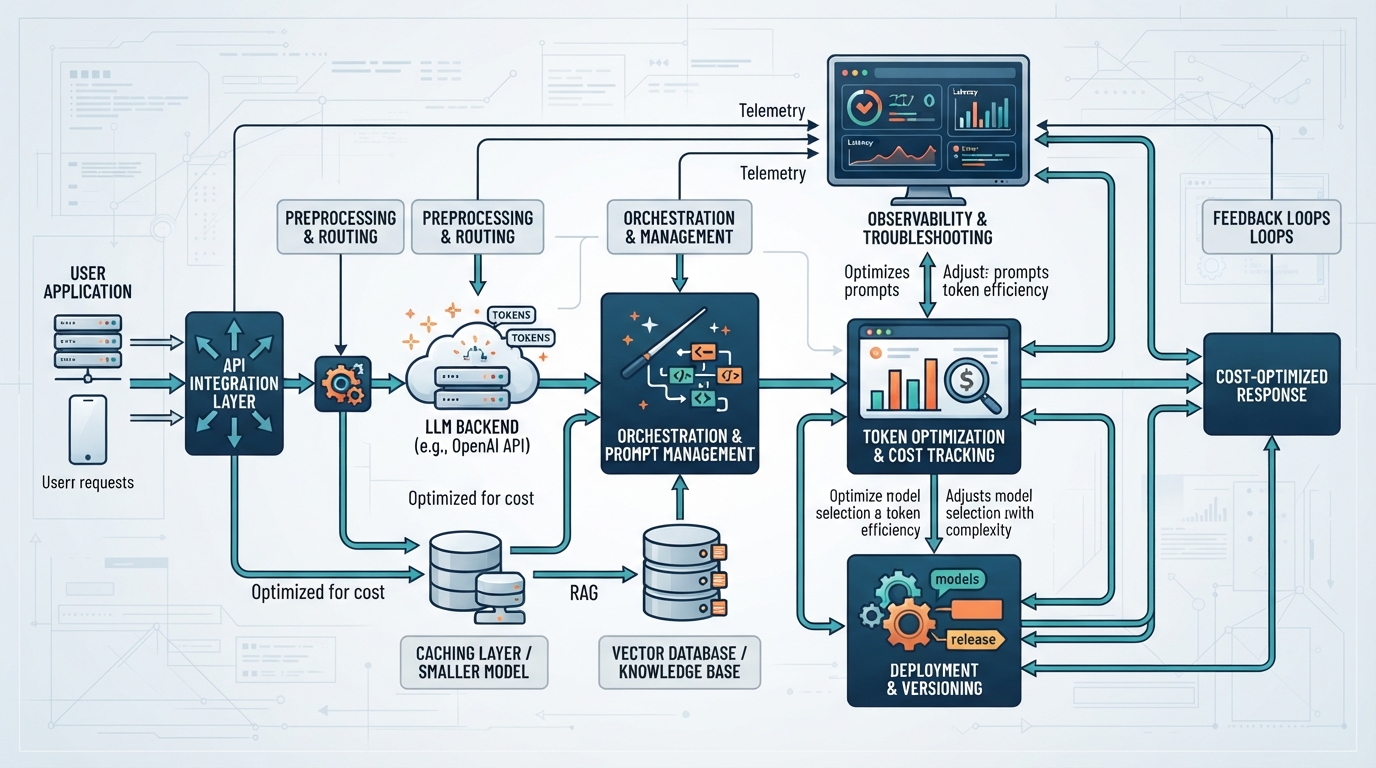
Model choice dominates unit cost: as of September 2026, GPT-4.1 costs about $2.50 per million input tokens, while GPT-4.1 mini is roughly $0.10. Use the largest model only for tasks that need deep reasoning or long-context synthesis. For classification, extraction, or summarization of short texts, test mini or even GPT-3.5 Turbo. Create a router that sends high-stakes queries to GPT-4.1 and bulk, low-risk prompts to mini. Measure task-specific quality with a gold set of 200 examples and a threshold like 95% F1 for classification. If mini meets the threshold, switch production traffic; otherwise, add few-shot examples or fall back to a mid-tier model. Re-evaluate thresholds quarterly as model pricing and capabilities change.
Caching, Batching, and Prompt Efficiency
Cache identical or similar requests at the application layer. For deterministic tasks, such as documentation lookup or product metadata extraction, use semantic caching with embeddings: store query-response pairs and return the cached result if similarity is above 0.95. For non-deterministic tasks, cache only the embedding of common long prompts and reuse them. Batch asynchronous requests into groups with shared system prompts where possible; OpenAI’s batch API offers 50% lower pricing for non-urgent work with up to 24-hour turnaround. Finally, compress prompts by removing redundant instructions, using concise system messages, and templating with variables instead of repeating full context. Track average prompt length per endpoint and set a budget, such as 800 tokens, to force architectural clarity.
Observability, Anomaly Detection, and Cost Guardrails
Instrument every call with request ID, model, token counts, and latency, and feed them into a centralized logging system like OpenTelemetry, Datadog, or Grafana. Build dashboards that plot cost per request, per endpoint, and per customer. Set budget alerts at 70% and 90% of monthly cap and hard-stops via an API gateway that rejects calls beyond 100% unless allowlisted. For anomaly detection, use a simple moving average with a three-sigma threshold or a machine learning model if seasonality is strong. When a spike occurs, check for prompt changes, retry storms, or a new model version. Have a kill switch to route to a cheaper model or cached response, but log the event and alert on-call engineers. Run chaos tests monthly by intentionally maxing out budget on a sandbox environment to verify that alerts fire and fallback works.
Sources
- OpenAI Pricing OpenAI · 2026-09-27 · 2026-09-27
- OpenAI Cookbook: How to count tokens with tiktoken OpenAI · 2026-09-27 · 2026-09-27
- OpenAI Batch API OpenAI · 2026-09-27 · 2026-09-27